
My Lightning Tracker Pro
JRustonApps B.V.Weather
4.7543.00 Reviews
- Version
- 26.3.1
- Installs
- 100.00K
- Age Rating
- Everyone
Screenshots
Our Review of My Lightning Tracker Pro
 Analysis by Appyee
I find a lightning tracker most useful when the sky is changing faster than a general forecast can explain. A storm can be fascinating from a window, but it is a different matter when I am choosing whether to walk the dog, keep a picnic going, or head back from a trail. My Lightning Tracker Pro is built around that narrow, practical question: where are lightning strikes being detected, and how close are they to me? That focus gives it a clear role alongside a regular weather app, rather than making it a replacement for one.
When the network is part of the experience
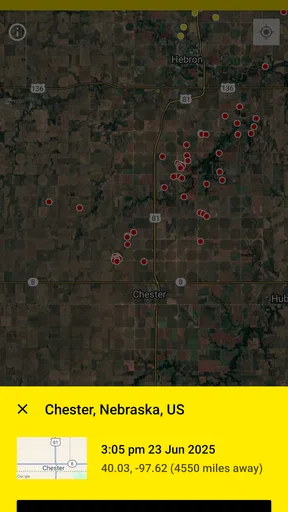
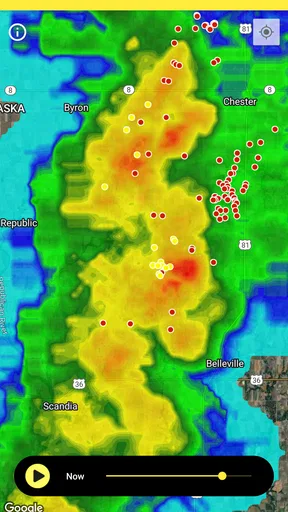
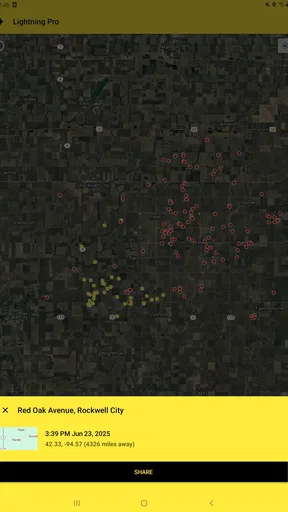
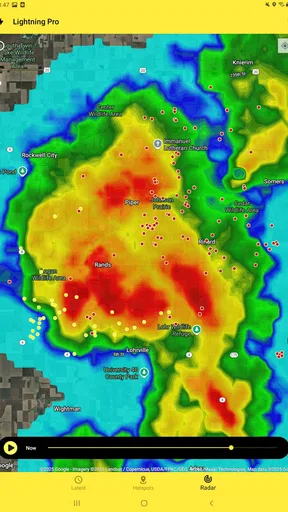
The map is the feature I would open first when a storm is approaching. It turns scattered reports into something I can inspect spatially, and zooming in helps me judge whether activity is near my area or farther away. Because the app’s central job depends on current strike information, a working connection matters: the map and alerts are most useful when they can refresh as conditions change. I treat what I see as a developing picture, not a promise that the next minute will unfold exactly as shown.
That distinction is important if I am making a safety decision. A lightning map can help me notice activity and reconsider an outdoor plan, but it is not a substitute for official warnings, local guidance, or basic storm precautions. I would not wait for an alert before moving indoors if thunder is already audible. The app is best used as another source of awareness, especially when I have a little time to decide what to do.
Useful in ordinary mobile situations
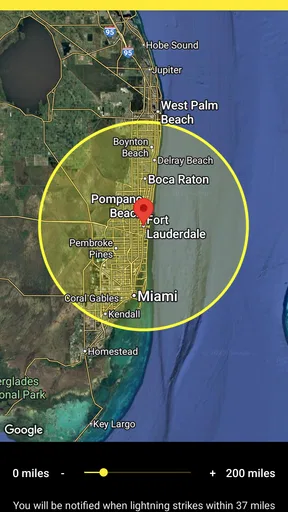
The distance-based notifications make the app more practical than a map I have to remember to check. I can set an alert threshold that suits where I am and what I am doing, then let the phone draw my attention if lightning is detected nearby. A tighter threshold may make sense when I am at home and only care about close activity; a wider one can be more useful before a long walk or outdoor event, when I want earlier notice. I would start with a setting that feels relevant to my plans and adjust it after seeing how often it interrupts me.
For example, if I am packing up after a picnic and clouds are building, I can check the map before deciding whether to linger. If the visible activity is moving closer, that is a sensible nudge to leave rather than waiting for rain to arrive. At a campsite, I might use the same check to reconsider a walk away from shelter. In both cases, the value is not dramatic storm prediction; it is getting a clearer reason to act sooner.
What to do when updates or alerts are delayed
Like any live information tool, a lightning tracker is only as helpful as the connection and the freshness of its incoming reports. If the map seems quiet while the sky says otherwise, I would check my connection, reopen the view, and compare what I am seeing with local weather guidance rather than assuming there is no risk. An alert that does not arrive should never be treated as evidence that conditions are safe. Keeping the app available and its notification settings enabled can help, but it cannot remove the uncertainty that comes with network-dependent updates.
I also like to separate “the app is not updating” from “the storm has passed.” Those are not the same conclusion. When I am relying on it for a decision, I check the map before leaving a place with shelter, and I keep a second source of weather information in mind. That small habit is more useful than repeatedly refreshing the screen while already exposed to bad weather.
Connectivity, battery, and sensible expectations
Frequent map checks and notifications are convenient, but they make most sense when I use them deliberately. I do not need to keep the screen open throughout an entire afternoon outside: I can check before setting off, enable an alert that matches the outing, and look again when the weather changes. This keeps the app in a supporting role instead of turning it into something I watch constantly. If I am trying to conserve mobile data or battery, opening the map only at decision points is a straightforward compromise.
Compared with a general forecast app, this one is more focused on observed lightning activity and proximity alerts; a conventional weather app is usually the better first stop for a broad forecast and other day-planning details. A radar view can help show precipitation, but lightning reports answer a different question, and neither view should be treated as a guarantee of safety. I see the tracker as a specialist tool: most valuable when thunderstorms are relevant, less compelling as the only weather app on my phone.
Getting Started with My Lightning Tracker Pro
Alright, let's get into it. First things first, downloading My Lightning Tracker Pro is a breeze. It's available for both Android and iOS, so no matter what device you're rocking, you're covered. Once you've got it installed, the app greets you with a sleek and user-friendly interface. Seriously, it’s like the developers knew exactly what we wanted – simple, intuitive, and no fuss.
Features That Strike
The app is packed with features that make tracking lightning strikes as easy as pie. Right off the bat, you’ll notice the real-time lightning strike map. It's like watching a live concert, but for lightning. You can see strikes happening globally, with the option to zoom in for more local action. This feature is perfect for those times when you're planning an outdoor activity and want to avoid getting caught in a storm.
Another cool feature is the customizable alerts. You can set up notifications to alert you when lightning is detected within a certain distance of your location. It's like having your own personal storm watch guard. Plus, the app provides detailed information about each strike, including the time it occurred and its distance from you.
Data and Accuracy
Now, let’s talk about data. The app sources its information from reliable networks to ensure accuracy. I've cross-referenced it with other weather services, and it holds up pretty well. The information is updated frequently, so you're always in the know. It’s a perfect blend of tech and nature, giving you a front-row seat to one of the planet’s most thrilling spectacles.
Navigation and Usability
One thing that stands out is how smooth the navigation is. The developers really nailed the user experience. Everything from the menu to the settings is designed to be intuitive, so you don’t have to be a tech wizard to get the most out of it. The app also runs without a hitch, which is a big deal for me because who wants to deal with crashes when you’re trying to track a storm?
Additional Perks
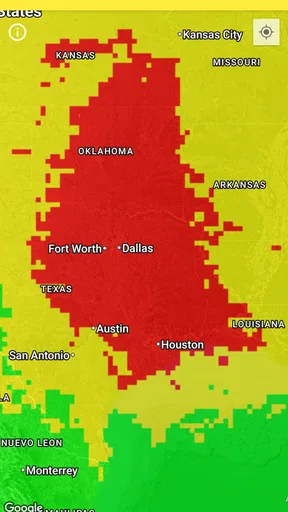
Apart from the core features, My Lightning Tracker Pro throws in a few extras that are worth mentioning. There's a historical data feature that lets you look at past strikes. This is not just fun but can be pretty useful for understanding weather patterns in your area. And for the data geeks out there, the app provides some neat graphs and statistics.
Another neat perk is the community feature. You can share your lightning observations with other users, making it a bit of a social experience. It’s like a weather-centric social network, which is a unique twist I didn’t expect but found surprisingly engaging.
The Final Spark
So, what's the verdict? If you're into weather, or even if you're just curious about when and where lightning is striking, My Lightning Tracker Pro is a must-have. It's packed with features, offers reliable data, and is incredibly easy to use. Whether you're planning a picnic, a hike, or just want to keep an eye on the skies, this app has got you covered.
In a world where we rely on our phones for everything from maps to messages, adding a lightning tracker to the mix is just another way technology keeps us informed and safe. So go ahead, give it a whirl, and let those lightning strikes light up your screen.
Who will get the most from it
I think this is a particularly good fit for people who spend time outdoors and want a quick, lightning-specific check without digging through several layers of a broad forecast. Hikers, campers, outdoor photographers, and anyone arranging an event outside can use the map to add context to a changing sky. Weather hobbyists may also enjoy looking back at past strikes and graphs, not just checking what is happening now.
It is less useful if you rarely encounter thunderstorms or want one app to handle every part of weather planning. A general forecast service is a better everyday home screen for temperature, rain planning, and the wider outlook. This tracker earns its place when lightning itself is the question. I would also skip relying on it as a personal safety system: no phone notification can replace taking shelter promptly or following local emergency advice.
Small habits that make the map more useful
One practical approach is to check the map before an outing, then choose an alert distance based on how much warning you want and how quickly you can reach shelter. The right threshold is not universal: a person in a park near buildings has different options from someone on an exposed route. After using it for a while, I would adjust the setting according to whether alerts arrive too early to be helpful or too late for the way I travel.
The historical view can also be more useful when treated as a learning tool rather than a forecast. Looking at past activity may help me understand how often lightning has appeared around places I visit, but it does not establish what will happen on a particular day. For a recurring outdoor routine, I would combine that curiosity with a fresh forecast before leaving, then use live reports as a prompt to reassess.
There is a trade-off in the social side, too. Sharing an observation can add a human perspective to the app, but I would regard community contributions as supplementary rather than a replacement for the strike map or official information. If I am in a hurry, I would prioritize the current map and my alert settings; browsing shared observations is better suited to a relaxed moment after the weather has passed.
Cost, platform, and final fit
JRustonApps B.V. develops this weather app, which is rated for Everyone and has a 4.7 average from around 8.9 thousand ratings. It has passed 100 thousand installs, and its current version is 26.1.1; the app was released on November 29, 2016. The price is $4.99, with in-app purchases listed at $0.99 per item, so I would consider whether the focused lightning tools fit my routine before paying rather than treating it as a universal forecast replacement. It supports operating systems from version 7.0.
Those details make the choice fairly clear to me: if lightning awareness is a recurring need, a dedicated map and configurable proximity alerts can justify keeping a specialist app around. If I only want an occasional glance at tomorrow’s weather, the usual forecast app is simpler and likely enough. My recommendation is to use this as one layer in a sensible weather routine: check the broader forecast before plans, consult the tracker when storms are relevant, and act on what the sky and local guidance are telling you. That balance makes its connectivity-dependent information useful without asking it to do more than it can.
Verdict
Strengths of My Lightning Tracker Pro
- User-friendly interface for easy navigation.
- Real-time lightning strike updates.
- Customizable alert settings.
- Detailed lightning maps with radar integration.
- Works offline for added reliability.
Limitations of My Lightning Tracker Pro
- Some features require in-app purchases.
- Notifications can be overwhelming at times.
- Initial setup might be complex for novices.
- Battery usage can be high with continuous tracking.
- Limited support for older device models.
Other Releases by JRustonApps B.V.
View All
My Moon Phase - Lunar Calendar
Weather4.8

My Tide Times - Tables & Chart
Weather4.8

My Hurricane Tracker & Alerts
Weather4.7

My Earthquake Alerts Pro
Weather4.8
Similar Picks in This Category
View All
Weather - By Xiaomi
Xiaomi Inc.4.1

Weather & Radar Forecast
WetterOnline4.8

Weather
OneLouder Apps4.6

AccuWeather: Weather Radar
AccuWeather3.6

The Weather Channel - Radar
The Weather Channel4.6

1Weather Forecasts & Radar
OneLouder Apps4.3
Frequently Asked Questions
What features does My Lightning Tracker Pro offer?
My Lightning Tracker Pro provides real-time updates on lightning strikes worldwide, with a user-friendly map interface. It includes customizable alerts for nearby lightning activity, historical data analysis, and a clean, ad-free experience. This app is ideal for weather enthusiasts and professionals who need accurate and timely lightning information.
Is My Lightning Tracker Pro available on both Android and iOS?
Yes, My Lightning Tracker Pro is available on both Android and iOS platforms. You can easily download it from the Google Play Store for Android devices or the Apple App Store for iOS devices. The app is optimized for various screen sizes, ensuring a seamless experience across different devices.
How accurate is the lightning data provided by the app?
My Lightning Tracker Pro uses data from reliable meteorological sources and networks, offering high accuracy in tracking lightning strikes. The app updates in real-time, making it a dependable choice for monitoring lightning activity. Users can rely on its precision for both casual observation and professional needs.
Does My Lightning Tracker Pro offer customizable alerts?
Yes, the app allows users to set customizable alerts for lightning activity within a specified range. You can adjust the alert settings based on distance and severity, ensuring that you’re notified only when necessary. This feature helps users stay informed and safe during storms.
Is there a cost to download or use My Lightning Tracker Pro?
My Lightning Tracker Pro is a paid app, offering an ad-free experience with premium features. The one-time purchase price provides access to all functionalities, including real-time tracking, historical data, and customizable alerts. It's a worthwhile investment for those who prioritize timely and accurate lightning information.
